
This post was originally posted on Interesting Retrospectives.
      ___           ___           ___                         ___
     /  /\         /  /\         /  /\          ___          /  /\          __
    /  /::\       /  /::\       /  /::|        /__/\        /  /::\        |  |\
   /__/:/\:\     /  /:/\:\     /  /:|:|        \  \:\      /  /:/\:\       |  |:|
  _\_ \:\ \:\   /  /::\ \:\   /  /:/|:|__       \__\:\    /  /::\ \:\      |  |:|
 /__/\ \:\ \:\ /__/:/\:\ \:\ /__/:/ |:| /\      /  /::\  /__/:/\:\_\:\     |__|:|__
 \  \:\ \:\_\/ \  \:\ \:\_\/ \__\/  |:|/:/     /  /:/\:\ \__\/~|::\/:/     /  /::::\
  \  \:\_\:\    \  \:\ \:\       |  |:/:/     /  /:/__\/    |  |:|::/     /  /:/~~~~
   \  \:\/:/     \  \:\_\/       |__|::/     /__/:/         |  |:|\/     /__/:/
    \  \::/       \  \:\         /__/:/      \__\/          |__|:|~      \__\/
     \__\/         \__\/         \__\/                       \__\|
tl;dr
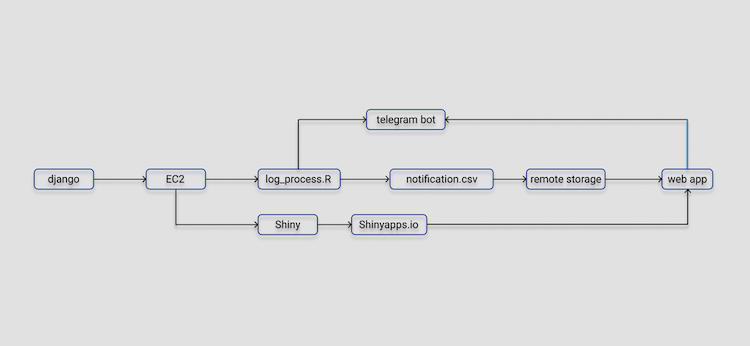
Implemented a alerting (kinda hard to call it “monitoring”) system for Django with R Server and a Telegram bot.
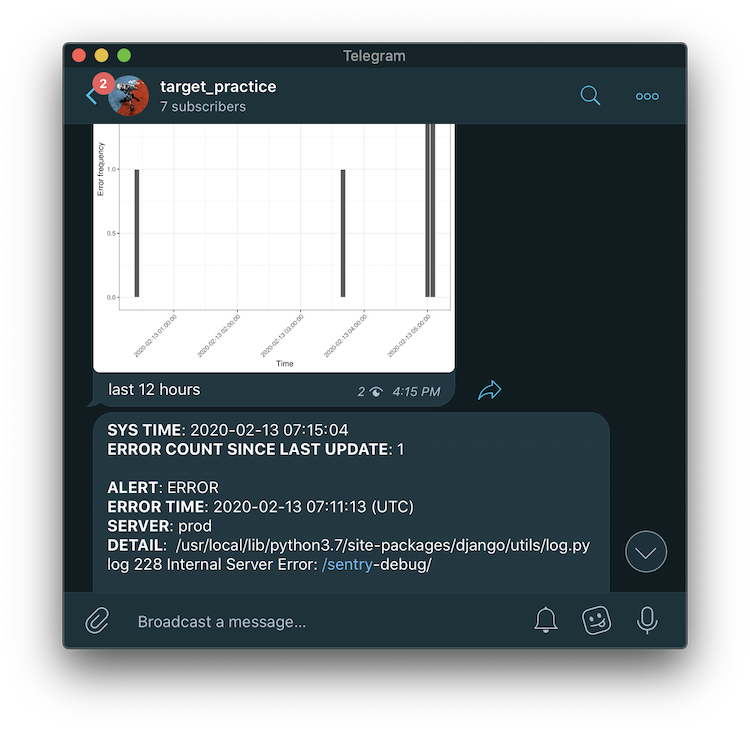
A typical instance of its report is like this:
Some errors occurred in the last 15 minutes on the server, a copy of log will be processed by sentRy. It will identify those new errors which have not been reported yet and save them to local storage. Meanwhile, the incremental part will be parsed to a telegram bot, sending error summaries and a recent 12-hour bar chart to a channel. At the same time, an updated copy of notifications (of course, errors) will be synced to Shinyapps.io and the Shiny app should have the latest info displayed.
It was designed to fulfill a particular job and I guess it got things done to some extent. But recently, our dev team deployed a fully functional monitoring system called Sentry. I mean, what a coincidence. I had no idea about this and only named it after the sentry gun in Team Fortress 2.
Dependencies
tidyversetelegram.botcronRshinyFilesaws.s3
How to use it (anyway)?
- In Telegram, create a new bot under the permission of @BotFather. Follow the order and make sure you have a valid API Token.
- You can test the basic message functionality with
bot_script.r. But it won’t be needed in the main script. - You can also test run the actual process with
log_process.r. - If there are problems no more, click
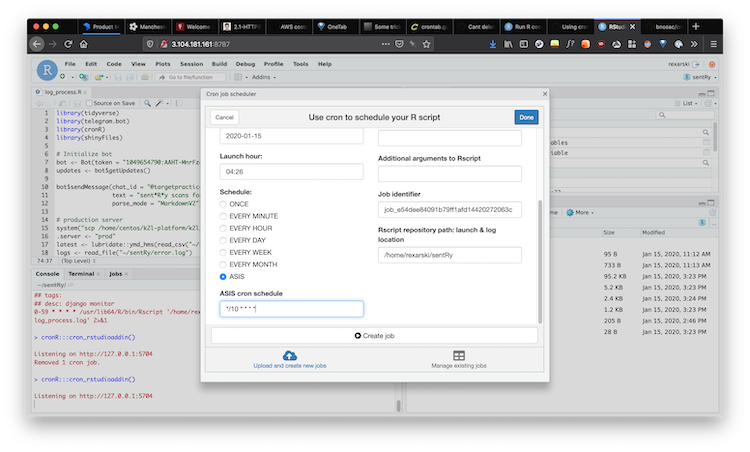
Addinin RStudio and select “Schedule R scripts on Linux/Unix”.
Related files
bot_script.rThe script for testing Telegram bot creation. Will be dropped later.dashboardA shiny app displaying all the errors.error.logAn error log copied from Django.global.rThe script dedicated to setting up S3 connection.log_process.rThe main script which needs to run periodically.notification.csvThe formatted backup of errors captured by this monitoring script. It is de facto very similar toerror.log.settings.csvA file to save some setting parameters including the latest reported error time.log_process.logThe R console log for runninglog_process.r. Potentially useful when debugging.
Issues
- Even the files published to shinyapps.io do not involve any unchecked files (when publishing), they will be verified any ways, thus leading to some filename and path related error returning. A better idea is to create a separate folder and zip it before uploading. Since I claimed all the paths absolute in my code due to the limitation of
cronR, I have toscpanother copy to the directory of shiny after writing tonotification. - You can always refer to the “Log” tab in shiny app to debug. Really helpful.
- Very hard to read a csv file without any column names in S3 bucket. The function
aws.s3::s3read_using(FUN, ..., object, bucket, opts = NULL)is problematic, as FUN cannot insert any extra parameters. It is a shame thatreadr::read_delimcannot be used as well. At last a blog post on Medium saved my life. - Something weird happens when
meta1andmeta2extracted have different length. Specifically,meta1with “ERROR|WARNING|CRITICAL” has fewer than the number of rows. That is to say, some lines are not starting with “ERROR…” Turns out my regex should start with a ^ otherwise things like "self._log(ERROR, msg, args, **kwargs)” could be matched as well. In short,
^